
FAQ
Frequently asked questions about Pine2Expert.
Getting started
What is Pine2Expert?
Pine2Expert converts your TradingView Pine Script v6 strategies into ready-to-run MetaTrader 5 Expert Advisors with real backtests included.
Do I need to know MQL5?
No. You write Pine Script, we generate the MQL5 Expert Advisor. You just install the resulting `.ex5` in MT5 and run it.
How are you different from AI-based Pine → MQL5 converters?
AI converters produce code that looks like MQL5 but tends to mistime signals or ignore market reality (bar timing, broker spreads, slippage). Pine2Expert does not use AI to write code: we built a real Pine transpiler and an in-house MQL5 library tested function by function. The result is an EA faithful to your original strategy, and every build is validated by a real MT5 backtest before delivery.
Which Pine Script version is supported?
Pine v6 only. v4 and v5 scripts must be converted to v6 in TradingView before pasting them here.
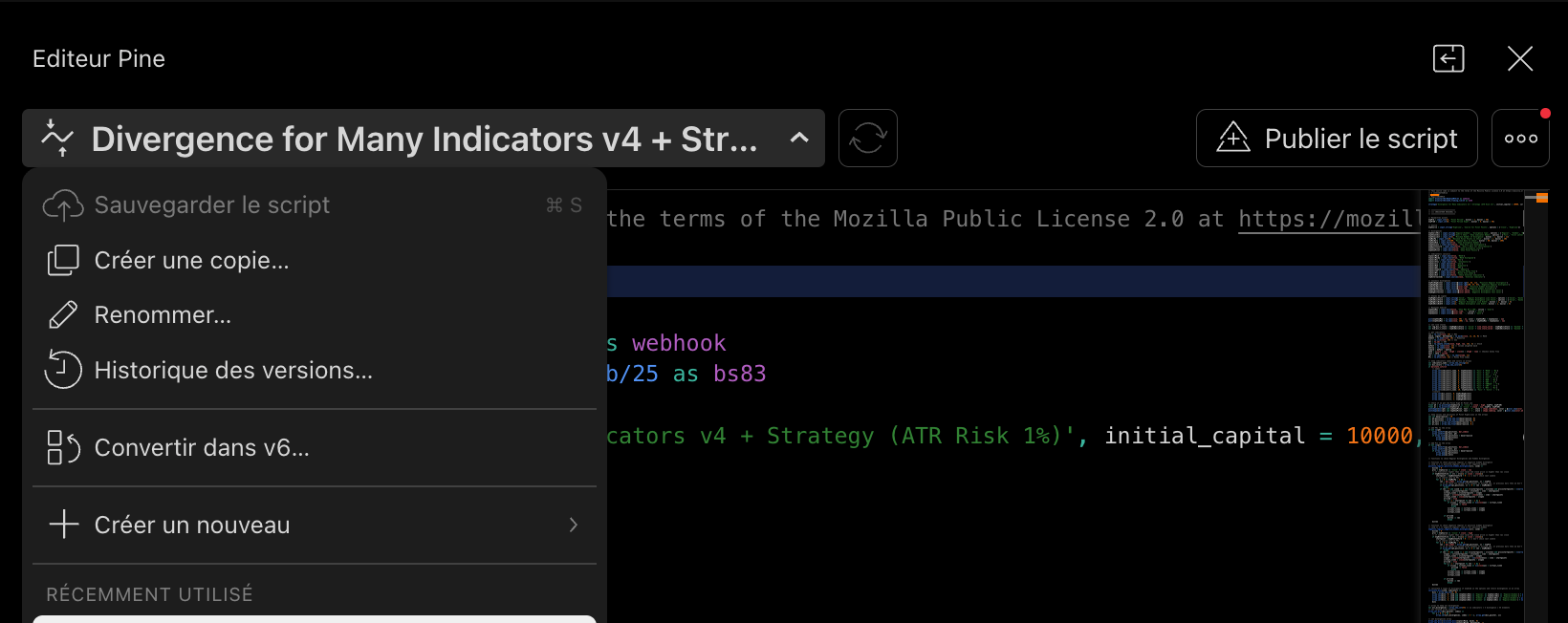
How do I convert a v4 or v5 script to v6?
Open the script in TradingView's Pine Editor: Pine Editor → Manage script → Convert code to v6. The auto-conversion handles ~90% of cases; fix any warnings, save, then paste the result here.
Behavior & broker
Why can my TradingView backtest differ from MT5?
TradingView and MetaTrader 5 don't test under the exact same conditions. TradingView usually works on bar-close logic, while the MT5 Strategy Tester uses ticks, spread, the broker symbol and the broker's parameters. Differences can appear on strategies sensitive to intra-bar timing, spread, sessions, slippage or broker symbols. Pine2Expert aims for behavioral fidelity as close as possible, but an MT5 backtest with your broker remains essential to validate the strategy.
Why can a conversion take time?
Because a serious conversion is not about generating code instantly. Pine2Expert parses the Pine script, transpiles the logic, compiles the Expert Advisor, generates the EX5 binary and validates the build in MetaTrader 5. This pipeline takes longer than an AI response, but aims for an exploitable result: an MT5 EA designed to reproduce your TradingView strategy behavior.
Why test with my broker?
Your broker directly shapes the results: spread, slippage, symbols, digits, tick size, commissions, server timezone and Strategy Tester conditions. A TradingView strategy can look great in a clean environment, then behave differently under your broker's real conditions in MT5.
Does Pine2Expert replace TradingView?
No. TradingView remains excellent to create, visualize and iterate on a strategy. Pine2Expert is for the next step: turning your Pine v6 strategy into an MT5 Expert Advisor to test and run it inside MetaTrader 5 with your broker.
Licenses & accounts
Can I run the EA on any broker?
Trial licenses are bound to the broker account fingerprint. Lifetime licenses run on any broker account (wildcard).
What is a time-limited trial license, and is backtesting also limited?
A **time-limited trial license** activates your Expert Advisor for **live trading on your broker for 30 days**. After that, the EA stops running live. **Backtesting in the MT5 Strategy Tester is unlimited** — you can analyze your strategy as much as you want, before or after expiry, with no restriction.
What happens when my trial expires?
The EA stops running **in live trading on your broker**. **Backtesting in the MT5 Strategy Tester stays free** — you can keep analyzing your strategy without a new key. To resume live trading, upgrade to a Lifetime license for the same Pine source — no recoding needed.
What does the account fingerprint contain — is it safe to share?
Yes, it is safe. The fingerprint is a one-way **SHA-256 hash** of your broker account number and server name — nothing else. It contains **no password**, no credentials, and your login number **cannot be reversed** from it. It only lets us bind one license key to one account, so you can paste it on the activation page without any risk.
Billing
Do you offer refunds?
Yes, on unused credit packs within 7 days of purchase. Refunds are not granted once compute has been spent (after submitting a build).